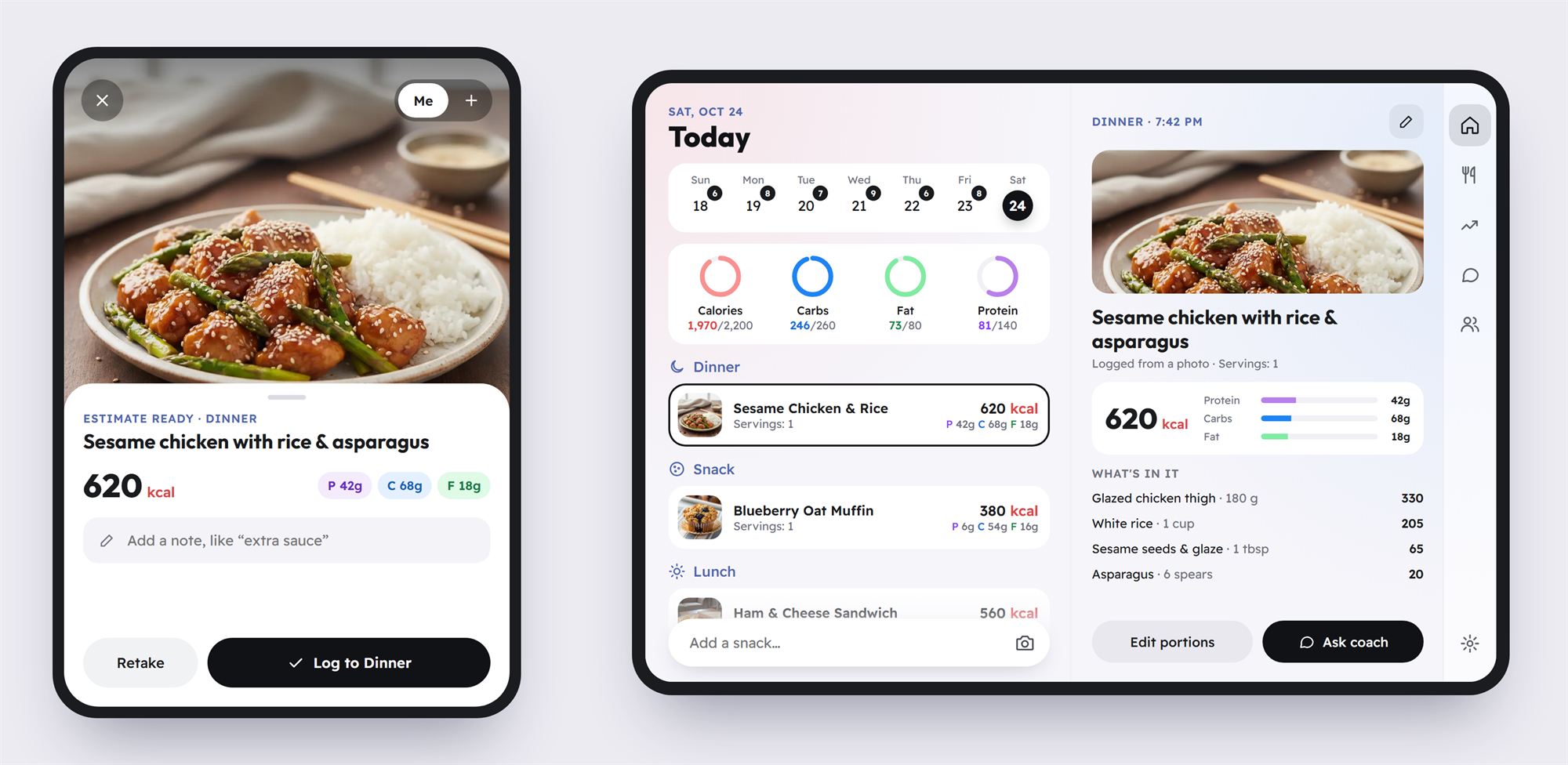
Some phones fold now. Apple's iPhone Duo went on sale on October 23 with a 5.4-inch screen on the outside that opens into a 7.6-inch screen on the inside (1). One phone, two very different ways to use it. We want Wellew to feel at home on both, so we're designing it around the Duo's two screens instead of just making the phone version bigger.
This is a look at what we're building, why, and where each piece stands. The screens on this page are early design concepts, so the details will change as we build and test them.
The short answer
- Wellew is coming to iPhone Duo. We're designing for both screens, not just scaling up the phone layout.
- Folded, it's the Wellew you know. Snap a meal, add a note, log it, all one-handed.
- Open, you see more at once. Your meals stay on the left, and whatever you tap opens on the right: a meal's details, your trends or the coach.
- Half-open, it stands on the counter. We're exploring a cooking view for meal-plan recipes.
- Same app, same account. Nothing extra to download or buy.
Why we're doing this
Tracking only works if you keep doing it. Studies on self-monitoring keep finding that the people who log consistently are the ones who lose weight, even when their logs aren't perfect (2). And consistency mostly comes down to friction: how many taps it takes, how much you have to squint, how often the app gets in your way. We dug into this in why most people quit calorie counting.
So we want Wellew to work well on whatever phone is in your pocket. It started on Android. The iPhone app is almost here, and we've already tuned it so text stays easy to read on an iPad. Phones that fold are the next step, and the iPhone Duo is Apple's first.
Two screens, two kinds of moments
Most food logging takes about ten seconds. You're at the table or in line for coffee, with one hand free. That's a job for a small screen you can work with your thumb.
Other moments are sit-down moments: looking back over your week, planning tomorrow, figuring out why the scale hasn't moved, asking the coach a question. Those need room.
A phone that folds is both. Closed, it's the quick screen. Open, it's the roomy one. So that's how we're designing Wellew for it: quick things on the outside, the bigger picture on the inside.
Wellew on the Duo, screen by screen
Folded: snap and go
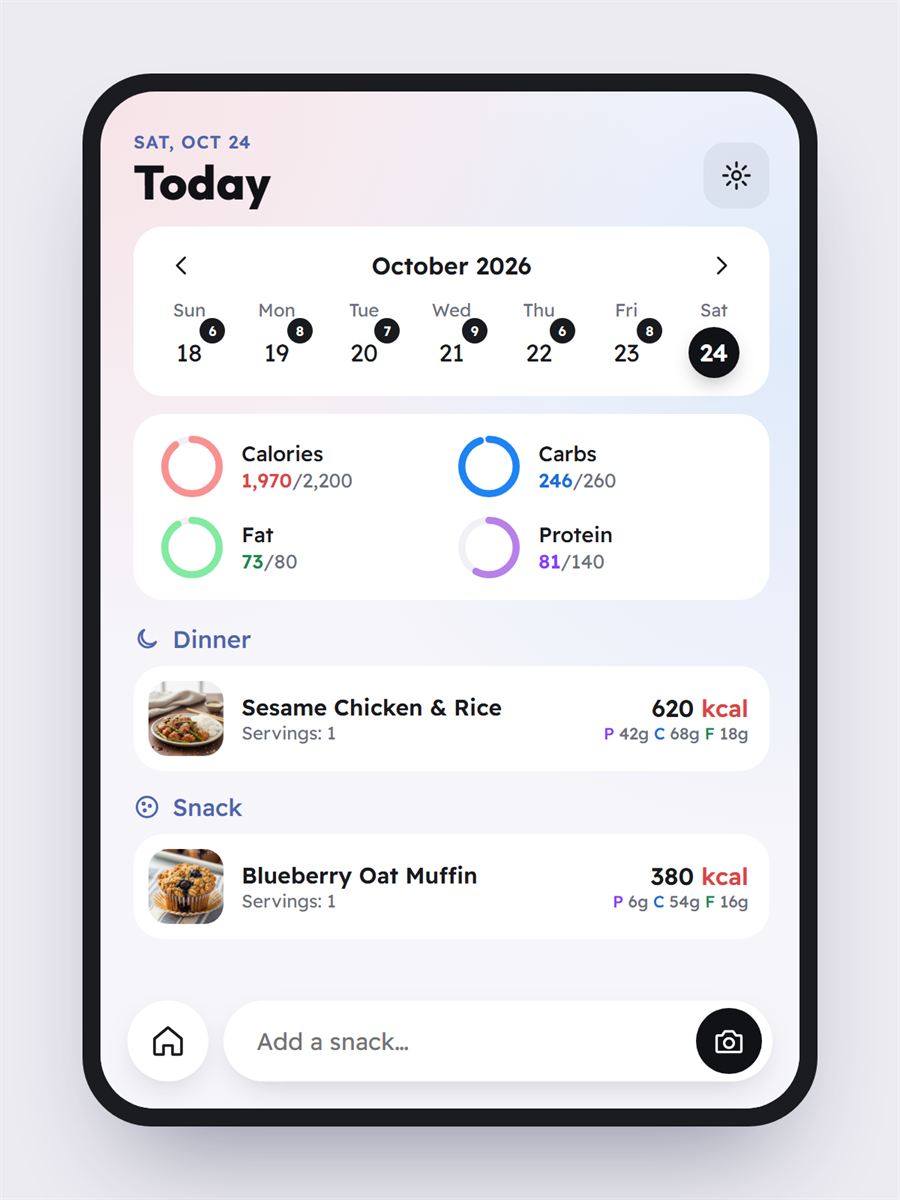
On the outside screen, Wellew works the way it does on any phone. The camera is one tap from Today, and you can add a note like "extra sauce" before you log, so the estimate accounts for what the photo can't see. The Duo's outside screen is a little wider and shorter than most phones, so we're tightening the layout to keep your rings and today's meals within easy reach.
Open: your whole day at a glance
Open the phone and Wellew splits into two panes, as in the image at the top of this page. Your day stays on the left: the week, your rings and every meal. Tap a meal and its details open on the right, ingredients and macros included, without losing your place in the list. Navigation moves into a slim rail along the edge, so the space goes to your food.
The coach next to your numbers
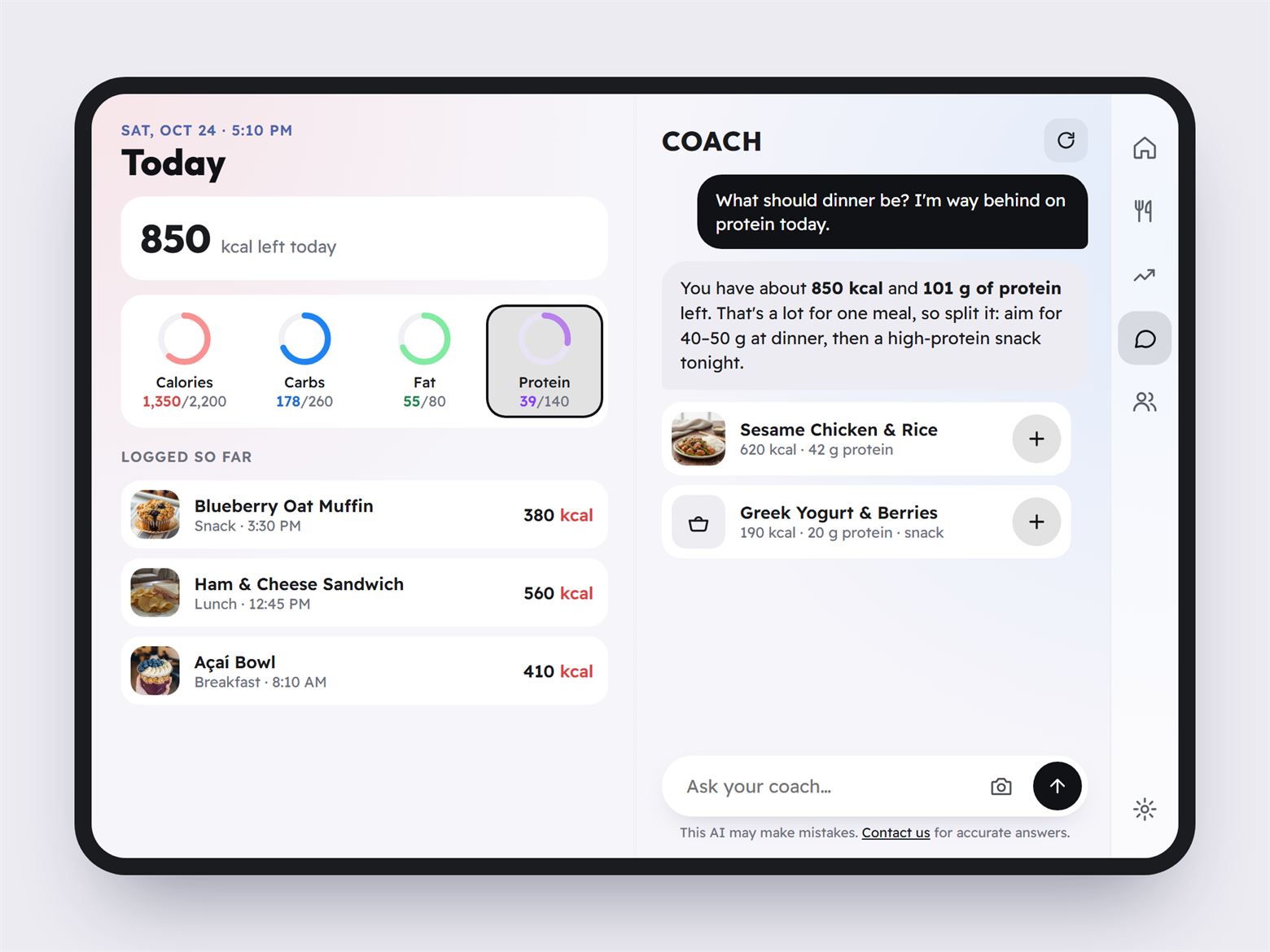
This is the one we're most excited about. On a phone, asking the coach means leaving your day behind. On the Duo, the coach sits right next to it. Ask "what should dinner be?" and you can see the numbers it's working from: how many calories you have left and how far you are from your protein goal. We're also exploring a way to add a suggestion straight to tonight's plan. If you haven't met the coach yet, here's why we built one in.
Charts with room to breathe
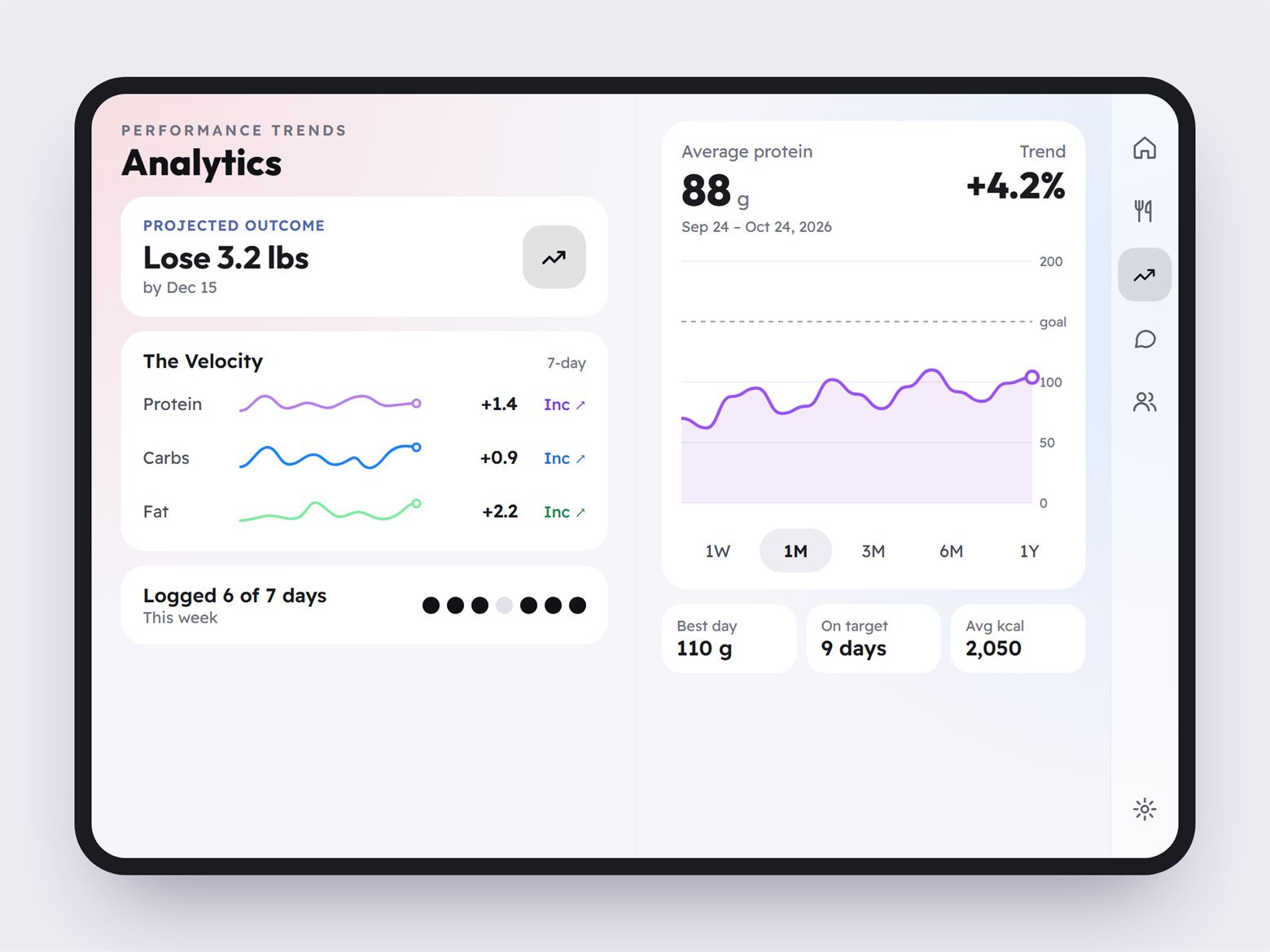
Trends feel cramped on a phone. On the inside screen, your projected outcome and seven-day trends sit on one side, with a full month of calories, protein, carbs or fat on the other. A pattern is a lot easier to spot when you can see the whole month at once.
Half-open on the counter
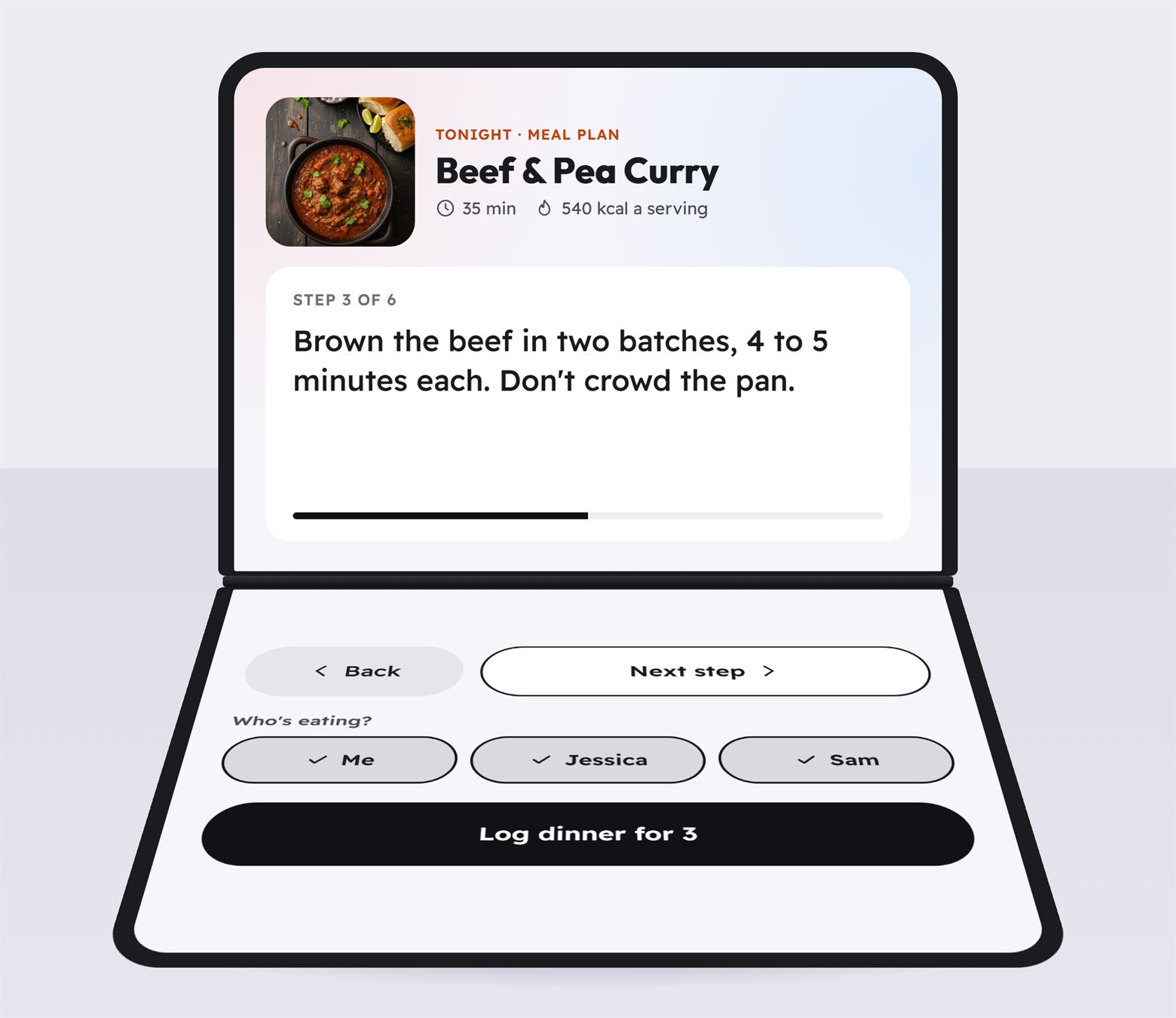
Fold the Duo partway and it stands up on its own. Apple pitches that for hands-free calls (1). We're exploring a cooking view for it: tonight's meal-plan recipe on the upright half, in text big enough to read from across the counter, and large buttons on the flat half so you can move to the next step with a spoon in your other hand. When dinner's ready, pick who's eating and log it for the whole table.
That ties into the family plan, which covers up to four people. If that sounds like your kitchen, we wrote about counting calories when you cook for a family.
Fold and unfold without losing your place
Start a photo log on the outside screen, open the phone halfway through, and you should land right where you were, now with room to see the whole day. It sounds small, but it's what makes a folding phone feel like one device instead of two.
Made for a phone you hold
The Duo's inside screen is close to small-tablet size, but you hold it like a book, close to your face. So we don't want to just hand it the iPad layout. A few rules we're designing by:
- Text sized for reading up close. A little roomier than a phone where it helps, never tablet-huge.
- Nothing important in the crease. Buttons and numbers stay clear of the fold.
- Panes that rearrange instead of stretching. Portrait or landscape, the layout reshuffles rather than pulling one column wider.
- One Wellew everywhere. Same account, same meals, same goals and coach chats, whichever screen you're looking at.
What about folding Android phones?
Wellew runs on the same code on Android and iPhone, so the layouts we're building for the Duo's inside screen are designed to carry over to folding Android phones too. We'll share more when they're ready to try.
Where each piece stands
| Feature | Status |
|---|---|
| The iPhone app | Almost here |
| Filling the Duo's inside screen | In progress |
| Two panes: your day and meal details | In progress |
| Coach beside your numbers | Designing |
| Charts on the big screen | Designing |
| Half-open cooking view | Exploring |
Have an iPhone Duo? We'd love to hear what you'd want on the big screen. Tell us here.
Questions
Does Wellew work on iPhone Duo today?
Not yet. The iPhone app is almost here, and support for the Duo's inside screen is in progress. We'll update this page when it's ready.
Do I need a different app or plan?
No. It's the same Wellew app and the same account, and Duo support doesn't cost extra.
Will my data look the same folded and open?
Yes. Folding and unfolding only changes the layout. Your meals, goals and coach chats stay the same.
What about folding Android phones?
The inside-screen layouts are designed to carry over to them too. Wellew is already on Google Play.
Start on the phone you have
Free on Android with 3 photo scans a day, a free barcode scanner and no ads. The iPhone app is almost here, with the Duo version on its way.
Get it on Google PlayJoin the iPhone waitlistReferences
- Apple Newsroom. "Apple unveils iPhone Duo." September 9, 2026. apple.com/newsroom
- Burke LE, Wang J, Sevick MA. "Self-Monitoring in Weight Loss: A Systematic Review of the Literature." Journal of the American Dietetic Association, 2011. doi:10.1016/j.jada.2010.10.008